

Lenovo ThinkCentre Neo 50q QC Performance and Compatibility
One of the key aspirations for Qualcomm’s Snapdragon X platform was to provide performance as good as (if not better than) similar low-power x86 processors. In practice, the bottom-tier X1-26-100 SKU is not going to show the Snapdragon X platform at its highest point, but it provides a solid baseline for comparison to similar 1L mini-PCs, all of which have to operate within the same thermal constraints as the Snapdragon X SoC in the Neo 50q QC.
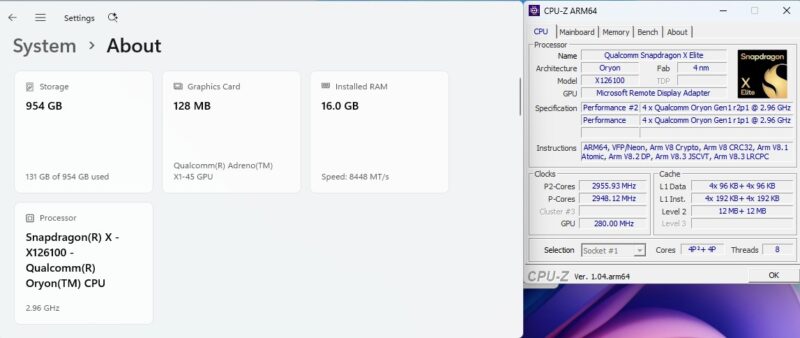
The X1-26-100 provides for 8 of Qualcomm’s Oryon CPU cores, arranged in two clusters of 4. These are all performance (P) cores, so each core is quite capable. But the maximum clockspeed of 3.0GHz means that the chip is never in a big hurry, even in lightly-threaded workloads.
As this is the first Snapdragon X machine to hit our labs, this is also our first real chance to evaluate its utility – and its compatibility – within the ServeTheHome world. This is one area where Patrick has been a bit hesitant to break away from his tried-and-true x86 boxes, which can run everything under the sun. And while the Snapdragon X-based 50q QC came pretty close to running everything – an important mark, especially as we are over a year past the initial launch of the Snapdragon X platform – there were still some growing pains in putting the 50q QC box through its paces.
Within the Windows ecosystem, the combination of the Snapdragon X hardware, Oryon CPU cores, and Prism x86 emulator works well for most things. Even when an ARM64 binary is not available (and this limitation is slowly decreasing), the 50q QC could run more x86/x64 programs we threw at it.
Though unfortunately for our benchmarking, we ran into a limitation with MLPerf Client. While MLPerf Client offers full support for the Snapdragon X platform, including Qualcomm’s NPU and their APIs, for non-obvious reasons the Snapdragon X platform is just a bit more of a memory hog. As a result, while most MLPerf Client workloads can run on systems with 16GB of DRAM, MLPerf’s developers require 32GB for Snapdragon X platforms. A limitation we did not notice until well after we had ordered the 16GB-equipped 50q QC box. This ultimately was not a binary compatibility issue, but it underscores some of the little differences even to this day between running Windows on ARM devices and on x86 devices.
Speaking of Windows, the ThinkCentre neo 50q QC is strictly a Windows box. Lenovo does not offer a factory install option with any Linux flavors (e.g. Ubuntu), and as we found out in testing, it is not possible to manually install Ubuntu on this box either. Without going too far into the technical nitty gritty, the current approach to supporting Linux on Snapdragon X platforms is for contributors to build a device tree for each and every device SKU. But as there is not a device tree available for the 50q QC, it is not possible to successfully install a Linux distribution on the box. While that may not always be the case, for now it means the 50q QC cannot be repurposed as a Linux box – it will always be running Windows.
In lieu of that, however, Arm devices get the same access to Windows’ excellent Windows Subsystem for Linux (WSL) virtualization environment, which allows for running Linux on top of Windows. So for anyone who needs access to Linux tools on the 50q QC, there are well-supported ways to reach that goal.

Outside of these issues, the compatibility of the Snapdragon X platform was unremarkable in our testing. Which may sound like a bland description, but it is exactly the kind of (nearly) frictionless experience that Qualcomm and Microsoft are getting closer to delivering.
Geekbench Results
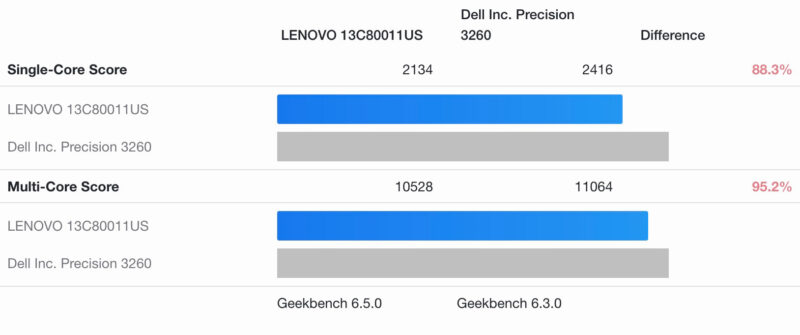
For our head-to-head comparisons, we have a few different systems on-hand. For a look at how things compare to an Intel system, we have Dell’s Precision 3260, a fellow mini-PC equipped with an Intel Core i5 12500 CPU. It is not quite an apples-to-apples comparison – the Dell is both bigger and more power-hungry of a system – but it is roughly the right competition for the low-end Snapdragon X SKU in terms of performance.
For a more iso-power Intel comparison, we also have iKOOLCORE’s R2 Max, a Core i3-N305 based system that’s all E cores.
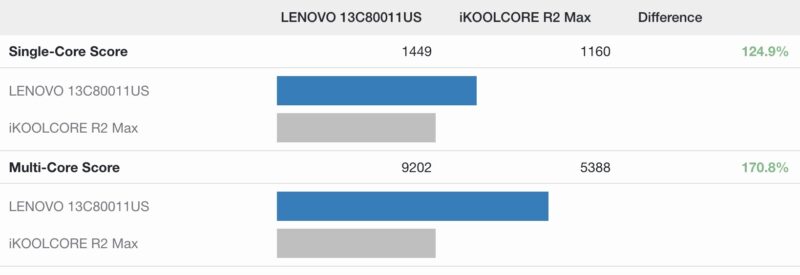
Starting with Geekbench 6, we find that the ThinkCentre neo 50q QC places in between the two Intel systems. The 50q QC has little trouble trouncing the very low power N305-based R2 Max, eclipsing it by between 50% and 100%.
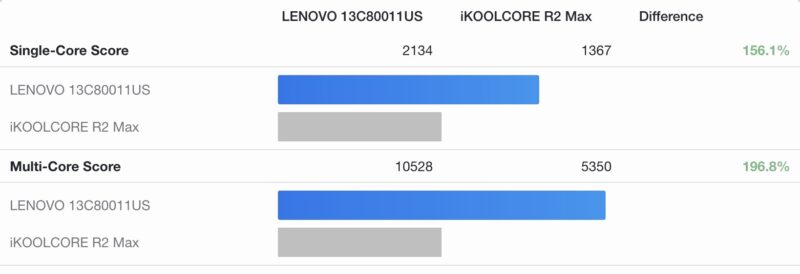
But against the more performant and power-hungry Core i5-based Dell, the Lenovo/Qualcomm system comes up short. The multi-core scores are within 5%, while the 50q QC falls behind a bit further in single-threaded workloads, showing the limits of a 3.0GHz peak CPU clockspeed for even lightly-threaded workloads.
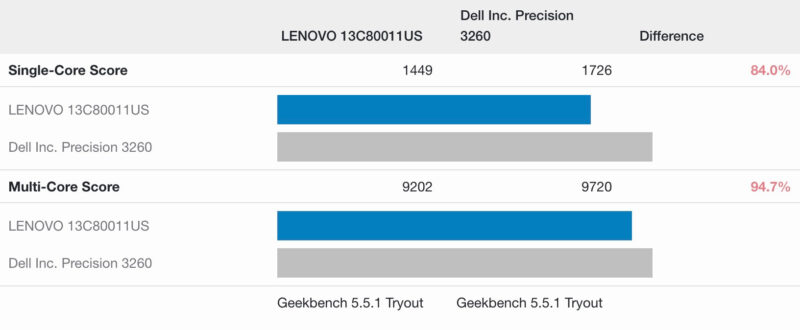
Meanwhile, in the older Geekbench 5, we see a similar situation play out. The scores are not as favorable to the 50q QC overall, but it holds its relative position. Meaning that it does quite well versus the N305 system, but falls a bit further behind the more powerful Intel Core i5 system.
And while we don’t have Geekbench 6 data for it, here’s how the 50q QC and its Snapdragon X SoC compare to an AMD-based system: Lenovo’s own ThinkCentre M75q Gen 5 Tiny (AMD), a similar mini-PC featuring an 8 core Ryzen 7 Pro 8700GE chip inside.
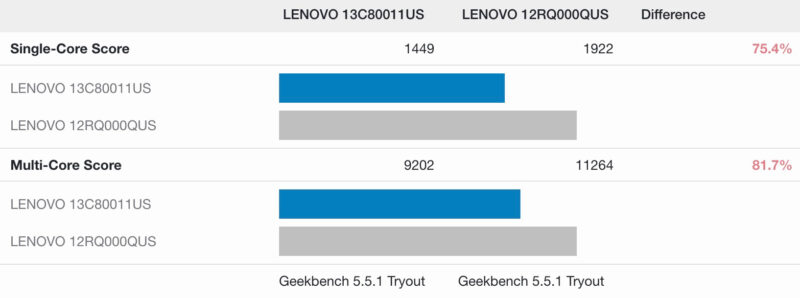
Like the Intel Core i5 system, this isn’t particularly apples-to-apples since the default TDP on the 8700GE alone is higher than the entire measured power consumption of the 50q QC. But it goes to show the same trends with regards to a larger gap in single-threaded performance.
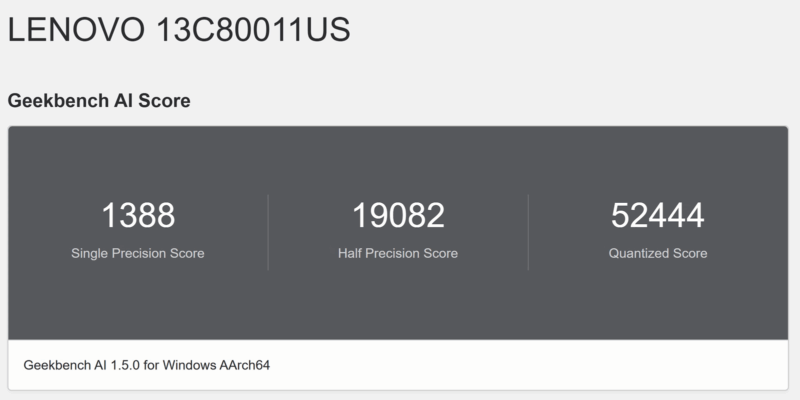
Finally, as noted earlier, we could not get our usual MLPerf Client benchmark running on the 50q QC due to a lack of DRAM – the client needs 32GB on Snapdragon X systems – so we cannot provide MLPerf comparisons here. But we did get the Geekbench AI benchmark up and running, showing what the Snapdragon X’s NPU can do.
Ultimately, while the top-line performance of the 50q QC is nothing to write home about, it does show up and get the job done.
Now let us take a look at the flip side of the coin, with Next, with a look at power and noise.


These will deprecate in value quickly.
1L is too big for this pc. Specially with the soldered ram.
Same lack of linux support as any random unknown ARM SBC.
It was my, admittedly layman’s, understanding that the UEFI ARM stuff was supposed to be generically discoverable and not require hardcoded device tree data. Is that only kind of/sort of true; and ARM vendors only care on server hardware?
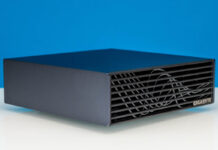
Am I the only one looking at the first picture thinking it is a CD-ROM?
Qualcomm is synonym of not able to run Linux
I also understand the Neo 50q Tiny QC is unable to run Linux.
For a home server that makes this hardware a nonstarter. Unsuitability for use in a home lab or other server environment is something I would expect emphasized in an article from a site called Serve the Home.
If, in fact, there were a way to load a mainstream distribution such as Ubuntu, Debian, Redhat or Suse, then it would be greatly appreciated to test that claim and explain how.
Qualcomm says it wants to be a player in the PC space, but their behavior still resembles something of a locked in cell phone. The Nuvia tech they acquired and bragged about for so long as surpassing Apple’s M chip is exactly why everyone scoffed at Nuvia pre-buyout. It never could and it still can’t.
I have tried working with Qualcomm on the 7C and it was a massive waste of time. Just too many proprietary bits and stupid design decisions to keep out the educated. Even working with their “Developer Community” portal, was a massive joke (on me).
You wont see them anywhere in my world. Good riddance.
You wrote “it can run our Windows applications, something the more widely popular ARM-based Mac Mini family could not do.”
But that’s not really true, is it?
This review would have been much more interesting if you had compared it head-to-head with a Mac Mini. Put Windows on the Mini, both with UTM (free) and Parallels or VMWare, and bench them that way. Also telling us about compatibility issues with Windows for both ARM PCs would be great.
After all, you seem to be OK with Linux through WSL, which is at least as much a stretch as UTM or another virtualization tool. Oh, and speaking of which, how about comparing and benching WSL with Linux in UTM?
This feels like a really not-useful review, because it doesn’t really answer the most important questions.
justsomeguy: Hey the Mac Mini advocate is back! Just as an aside, UTM Windows is only free for evaluation purposes!
This device has no reason to exist. It costs $629 (Amazon) yet gives worse performance than a 2018 Intel Core i5 Mac Mini that you can get refurbished for under $200. It is appalling that no good workstation or even prosumer ARM APU exists after all this time. They are simple to make.
1. Use 16-32 Cortex X cores i.e. Cortex X-3 or Cortex X-295.
2. Use 8-16 Neoverse N1, N2 or V1, V2 cores.
Nothing keeps the ARM client companies like MediaTek and Qualcomm from doing 1. Nothing keeps ARM server companies like Ampere and Marvell from doing 2. And nothing keeps Nvidia, who makes ARM client AND server chips, from doing so.
No, you can’t run Windows on them because of this ridiculous contract that Microsoft signed with Qualcomm for Windows on ARM exclusivity to cut Microsoft’s losses. But you can run Linux on them, and let’s face it, developers, systems architects and other Linux users are going to be the only ones with a real need for an ARM workstation that doesn’t run macOS in the first place.
@rano: I’m hardy a Mac Mini advocate. I believe in the proper tool for the proper job, which is why all my servers are EPYCs. But it’s an astonishingly compact and low-energy device for so much power. That makes it tempting to find novel uses for it.
Your claim that “UTM Windows is only free for evaluation purposes” is BS. UTM is free, period. (So is VMWare for Mac, last I checked, though that company seems utterly toxic now and I’m avoiding them.) Of course, *windows* isn’t free, but that’s true on every platform.
Also… “Nothing keeps the ARM {client, server} companies…” Clearly *something* is doing exactly that, because they haven’t done it. That something is, of course, economics. Which comes right back to the main question, which is, it the Mini a better (= “more economical”) solution to some problems? It clearly isn’t, for your problems. But your problems are just one category.
@justsomeguy:
” Of course, *windows* isn’t free, but that’s true on every platform.” Which is what I meant: the Windows license is only free for evaluation purposes.
Sorry, but any temptation to find novel uses for a device with 2100 single core performance, worse than a Core i3 14100F and not much better than a Ryzen 3 110, is removed by the $630 price. “But it’s an astonishingly compact and low-energy device for so much power” is only true for a Mac Mini. You can set one to low power mode and still get better single core performance at less than 25W.
Is the Mini a better solution for some problems? Clearly. But not all of them which is why we need better Linux ARM tech. System76 will sell you a 32-core Ampere Altra CPU, 4 GB VRAM Nvidia card and 64 GB RAM system for $3300, which is M4 Max 16″ MacBook Pro money. ($350 more will get you a 16GB Nvidia 5060 Ti.) The Nvidia DGX Spark is cheaper, but not much and isn’t practical for much more than LLM development.
I say that a good ARM SOC would sell and that MediaTek, Nvidia, Samsung etc. are leaving money on the table by not making them. Indeed, Samsung actually wanted to do something in this area for Chromebooks but Google wouldn’t let them. Google later tried to design one themselves, didn’t like the early results and just gave up. Right now it looks like Valve’s desire for an ARM APU to replace the AMD one in the Steam Deck is the best bet to finally get movement on this.
No Linux compatibility. Soldered RAM. Only 1GbE. I’ll pass.
What I believe is more interesting is that Lenovo thinks Windows on ARM has (or will have) a big enough part of the market to justify making this thing.
@rano: No argument about the Lenovo. My comment about novel uses was referring to the Mac Mini, not the Lenovo (or QC PCs in general, so far).
It’s not clear to me that the Ampere is a better buy than an M4 Studio or M3 Ultra, depending on configuration and what you’re trying to do. (Clearly, if you need a ton of fast SSD, the Mac’s going to be crazy expensive, and depending on how parallelizable your tasks, the Ampere might have a performance edge… though probably not in most cases.) It will probably again be a question of compatibility.
So, yeah, better Linux ARM tech sounds good. But you don’t have it right now, and that makes for interesting questions when you don’t want to (or can’t) use x86.
@justsomeguy:
Oh no, Mac Minis aren’t just good for novel stuff. They are great for anything that doesn’t absolutely require running Linux (or Windows) natively as opposed to virtually. Sadly, there are more than a few things that do.
But I think that you are missing my point. The Ampere with more than 4 GB VRAM is $3600. Your M3 Ultra Mac Studio is $4000. Both are WAY more powerful than most people need and you are very much paying for all that power. Meanwhile you can get a great x86 system, Ryzen 9 with Nvidia 5080, for $2500. You can get a very good one, Intel 7 with Nvidia 5070, for $1500. And you can get a mini PC with integrated graphics that are as good as an Nvidia 3050 on a lot of workloads for under $700. Those are what a lot of people need and ARM options simply aren’t available. And if you need discrete graphics or to run a different operating system natively, not even Macs are an option.
My take on this is that there’s zero benefit over an i5 or Ryzen U unless it’s fanless or cheaper (and it’s neither of those things). If that requires a differently shaped chassis (to accommodate eg a Macbook Air-style cooling system), so be it.
Incidentally, happy to see Ryan Smith’s byline – miss Anandtech a lot.
“Even then, the only user-serviceable parts are not covered by the fan or heatsink, so it is not necessary to disassemble the 50q QC any further to make any upgrades. But where is the fun in that?”
Love it!