

About 10 months ago I decided to enter the world of the Windows Home Server. My storage arrays had outstripped my Cosmos S’s capacity, and running multiple controllers for all of the SAS drives as well as SATA storage became too much. My decision to build a WHS v. buy one was made due to sub-$100 Seagate 1.5TB 7200.11 drives (at the time very inexpensive) so I bought another eight drives just to fill up an 8 port raid controller.
The Original WHS Specs Were:
- Intel Core 2 Duo E6420
- 4GB OCZ Platinum
- Gigabyte GA-EP45-UD3P Motherboard (Dual Lan and a great board)
- Adaptec 31605 w/ BBU
- EVGA 7200GS (passively cooled)
- Norco RPC-470 4U Rackmount
- 2x iStarUSA BPN-350SAS-Black (5 in 3 enclosure)
- 1x ICY DOCK MB453IPF-B (3 in 2 enclosure)
- 1x LG Blu-Ray Drive
- 2x 1TB Seagate 7200.11 drives in Raid 1
- 11x 1.5TB Seagate 7200.11 drives in Raid 6 + hotspare
- 3x 500GB Western Digital RE2 drives in Raid 5
- Windows Home Server Retail
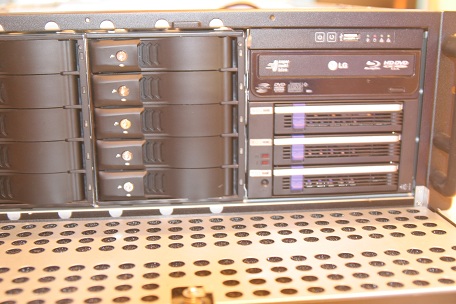
Obviously, with 16 hard drives, a dedicated Raid card with BBU, and a server chassis, this was going to be something a bit more involved than a HP MediaSmart (which are great machines, but in a different ballpark).
After about a week of building, a week of burn-in, and some heartburn getting everything set up decently well, the server was off and running. One thing I had forgotten is that WHS is built on Windows Server 2003 and can only utilize MBR partitions. While this is generally fine, the 11x 1.5TB drives – 2x for parity and -1x for a hotspare yielded 10.92TB of available storage (1.365TB x 8). Due to the MBR partition and WHS limitations one can have a maximum of 8TB in a raid array for WHS on a set of drives. This is because 2TB per MBR partition and 4 partitions per device. Sadly, this mistake required a lot of time to fix, yet it had stranded almost 3GB of space!
As the months went by, the WHS had backup duties, even for images of system configurations that I casually would load on various pieces of hardware. I started storing/ streaming media, using the WHS to hold HD camcorder video, and virtual machines (even mapping VM drives to the WHS shares) on the WHS and quickly found myself running out of space.
Enter The Big Windows Home Server. Over the next few weeks I will be detailing a build that will double the space, and increase the processing power severalfold. The goal is to be able to use the WHS for more, including running virtual machines, and doing encoding on-box.
Stay tuned for more!
“11x 1.5TB drives – 2x for parity and -1x for a hotspare yielded 10.92GB”
You probably meant “TB” instead of “GB”. I can’t wait for more info 😛 You should include some inside pics just for hardware pron
Thanks. Fixed 🙂 Part 2 – Hardware Specs / Rationale tomorrow.
nice post. thanks.
Nice setup! I want to fix my storage problem and this box seems to be the way to go except I am going to use Solaris Nevada instead of WHS. With Solaris 10 Pro, Nevada and OpenSolaris, I can use the ZFS file system as JBOD without using a RAID card. Now all I would have to get is the TB drives.
If you are going to JBOD, and no raid card, WHS Is pretty darn easy to setup and manage. No doubt ZFS has advantages, but WHS is great from a management perspective (especially with Windows XP / Vista / 7 clients). It costs $100 extra, but when I think about the time it has saved me over the past 14 months it is well worth it.
I’m actually going to be retiring the box listed above during the second week in March. It has been a great setup to this point, but I needed a much larger setup that can handle 8GB+ of ram and more cores.
not that it matters with WHS v2 almost out… but in windows server 2003, you could concatenate 2TB luns together instead of using partitions on one big lun. Not sure if you can do that in WHS though.
Nice website btw! I just found it today and this is exactly the kind of stuff I’ve struggled with for years. How to build an affordable storage setup for the home! I’ve got a Lian-Li tower case stuffed with 20 drives and 2x 3ware 9690’s… I wish I could find something similar to your rackmount setups in a tower format though.
I look forward to perusing your other articles.
nevermind, I see that you’ve found WHS does not play well with dynamic disks… Vail to the rescue I guess. 🙂
I came across this problem on an HP MSA storage shelf that itself was limited to 2TB per exported volume, so that’s when I went with the concatenation route.