Tag Archive | "rpc"

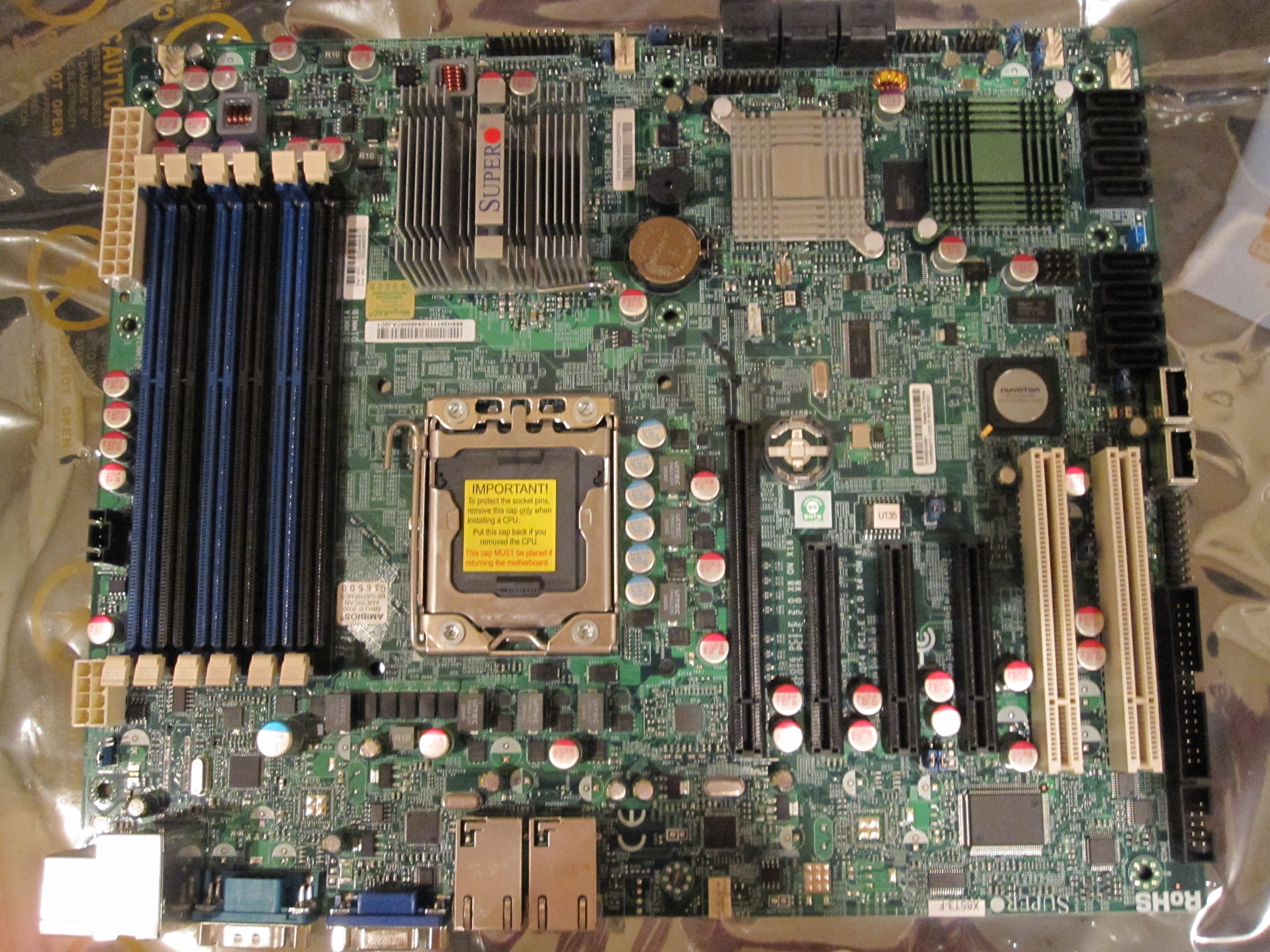
Supermicro X8ST3-F IPMI 2.0 Power Control, KVM over IP, and ISO mount

Supermicro X8ST3-F Motherboard Review

My main server, the Big WHS now houses over 60TB of storage, runs multiple VM’s, and has over 10 Gigabit NICs. At the heart of this server, is a Supermicro X8ST3-F. It was not the first motherboard I tried in the server, as I originally tried using an ASUS P6T7 WS Supercomputer in the Big WHS, but it has been running solidly since its first installation. Aside from its stability, it also comes with many PCIe slots, an onboard LSI 1068e based 8 port SATA/ SAS controller, dual Intel Gigabit NICs, onboard video, and IPMI 2.0 with KVM over IP.

Read the full story

Posted in MotherboardsComments (26)

Supermicro RMA Support for the X8SIL-F

As I mentioned in the previous post on the compatibility issue, I had to RMA my Supermicro X8SIL-F (mATX LGA 1156 server board with IPMI 2.0 and dual Intel gigabit NICs) last week because it was version 1.01 PCB instead of v1.02. The difference being support for Clarkdale CPU’s.

Just to give an idea of why Supermicro’s support is so good here is the timeline:

  1. Sunday (day 0) - Sent a note to Supermicro tech support explaining my problem.
  2. Monday morning (day 1) - Received a confirmation that I needed v1.02 PCB of the X8SIL-F to use with my Intel Core i3-530.
  3. Monday afternoon – submitted my RMA request online
  4. Tuesday mid-day (day 2) - was contacted by Supermicro RMA support, I gave the requried information for advanced RMA. Later that day I got a follow-up e-mail saying that the advance RMA request had to be approved and that it may take until the next day.
  5. Wednesday (day 3) – confirmed that I accepted the Supermicro advance RMA policy, and that ground shipping would be fine (I live only a few miles from a Supermicro facility).
  6. Thursday (day 4) – New X8SIL-F shipped.
  7. Friday (day 5) – X8SIL-F was at my doorstep. I was not home to sign for the delivery, so made arrangements to pick up at the UPS facility. Bottom line is that Supermicro had the replacement board at my doorstep within 96 hours of submitting my RMA request.

Overall great service from Supermicro! I have also decided that I will house this in the Norco RPC-4220 that serves as the DAS box for the Big WHS. That way I can use it to add drives for the test environments. Odds are I will either run ESXi with a few Linux/ FreeBSD/ OpenSolaris virtual machines or just run OSes directly on the PC. I am also planning to power this system independently of the rest of the enclosure and drives so that I can power cycle the server without taking the drives off of the Areca array.

Posted in MotherboardsComments (4)

Vail fails installation check with a 120gb drive which is less than the 160GB requirement

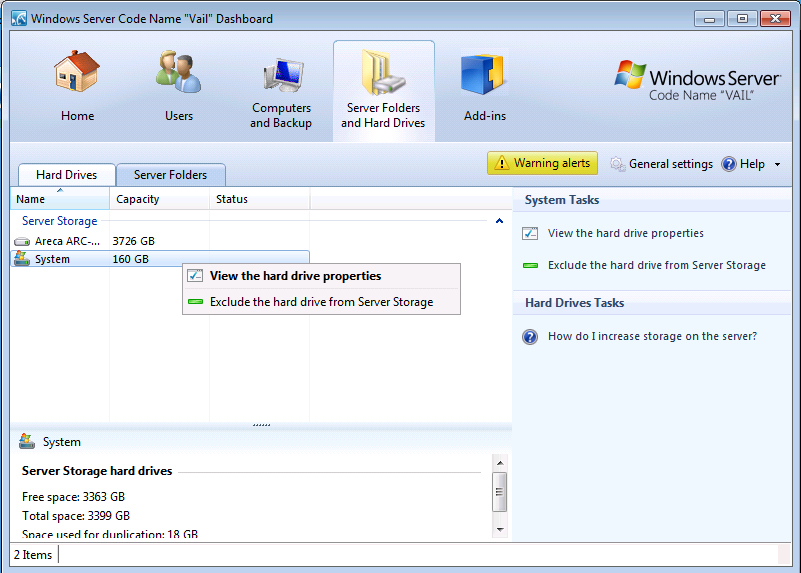
Exclude System Disk from Server Storage in Windows Home Server (WHS) V2 Vail

Many Windows Home Server machines utilize a smaller OS disk (oftentimes in Raid 1 for redundancy) and then large SATA 3.5″ disks for storage. Common 2.5″ disks are laptop drives as well as SSDs. Another factor influencing their popularity in home-built WHS boxes is the fact that the Norco RPC-4220 (a popular home server 4U rackmount enclosure) has the ability to house two 2.5″ hard drives in addition to 20 SAS or SATA drives. Smaller form factor drives tend to be of lower capacity than larger 3.5″ counterparts, so some users may be wondering with the new requirement of a 160GB Operating System (OS) disk in Windows Home Server (WHS) V2 Vail if it is possible to lower the OS disk space requirement.

Posted in Windows Home ServerComments (0)

FreeNAS Hyper-V LAN Finish and Exit Config

Install FreeNAS in Hyper-V: Part 2 Installing FreeNAS to a vhd

In previous articles we have shown how to set up a basic Hyper-V virtual machine that works with FreeBSD and FreeNAS as well as how to configure the Hyper-V VM and boot FreeNAS in it. The next step of course is to install FreeNAS to a vhd, so it no longer needs to run off of the LiveCD. This is primarily important so you can configure FreeNAS and save that configuration through reboots. Also, as FreeNAS seems to only work with drives attached to the IDE controllers, installing FreeNAS to a vhd allows one to free up one IDE channel for another drive (by removing the default DVD drive).

Read the full story

Posted in Hyper-V VirtualizationComments (2)

Server Parts by Amazon.com

Image of Hitachi Deskstar 2 TB 3.5-Inch CoolSpin RPM SATA III 6Gbps 32 MB Cache Internal Hard Drive 0F12117 Hitachi 5K3000 2TB
Image of Xeon Qc E3-1235 Processor Intel Xeon E3-1235
Image of Intel Core i7-2600K Processor 3.4GHz 8 MB Cache Socket LGA1155 Intel Core i7-2600K