

Just to check some additional 15k rpm SAS numbers, I used three Seagate Cheetah 15k.5 300GB drives in Raid 5 to see what the numbers would look like. The drives are 3.5″ form factor units so they run quite a bit warmer than the 15k.1 2.5″ Savvios that are also in this machine. First the chart:
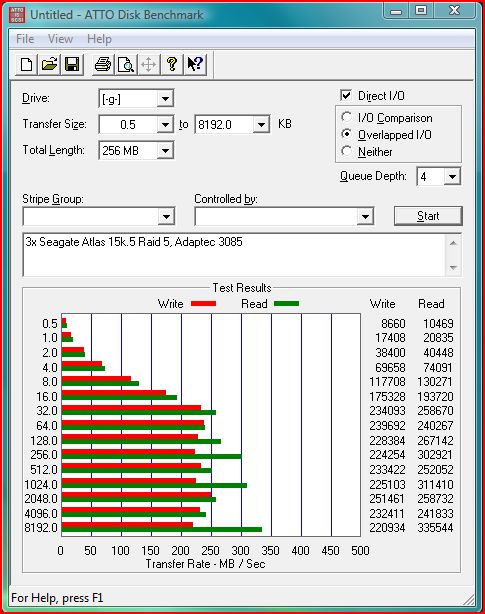
Interesting note here is that these three drives are performing about the same speed as one SSD, trading off better write speed performance on the SAS drives for lower access times/heat/noise/power consumption on the SSD’s.
For a comparison (09 June 2009) a OCZ Vertex 250GB is on sale for $749 at NewEgg.com with about the same read speed, yet about half the write speeds. The drives here were purchased for $150 shipped each. I purchased the Adaptec 3085 sample, with battery back-up for $160 off of ebay. For a total of $610 shipped the setup has an interesting value proposition still.
3x 300GB 15k.5 v. SSD Pros:
- Greater storage capacity (600GB usable in raid 5 versus 250GB on the OCZ Vertex)
- Faster write speeds (Approximately double the OCZ Vertex single drive)
- Lower cost ($610 v. $750)
- Fault tolerance (Raid 5 v. single drive)
3x 300GB 15k.5 v. SSD Cons:
- Larger physical footprint (3x 3.5″ drives plus likely a SAS controller in a PCIe slot)
- Requirement of SAS controller (Some motherboards such as the Asus P6T have onboard controllers)
- Greater heat generated, power consumed, and noise versus SSD’s.
- Higher access times as spinning platters are generally slower than SSD’s.
Overall, this is an interesting value proposition for direct attached storage. The controller used, an Adaptec 3085 is not the fastest card by any means. However, it is inexpensive and as an interesting feature can connect 8 drives externally or 8 drives internally depending on the cables used. Akin to a Dell Perc 5/i pricewise, however it works without the tape mod on Intel motherboards. I tested the setup on the Adaptec 5805 which uses the much faster dual core IOP348 at 1.2ghz and that has 512MB of onboard cache, however results were the same as above.


Hi, did you re-route the cable back into the server or do you have and external drive cage for the Adaptec 3805
I actually re-routed the external cables to an internal/external converter by looping the external cables through the Cosmos S’s watercooling hose ports. Quick and simple, requiring no cutting of the case. My watercooling setup does not require the hose ports so it was a great fit.
I read at xtremesystems.org that you are using 5-in-3 cases in your Cosmos S. Is this correct? Is it the Supermicro CSE-M35T-1B? I’m planning to get a new case with flexible storage enclosure and want to know if it will fit. Oh, and how is the cooling?
I had been using the iStar units mentioned here: http://www.servethehome.com/?p=119 That particular unit is re-branded by many manufacturers so it is easiest to verify by pictures. That Supermicro unit is probably one of the ones I would consider doing it again.
I’ve actually moved all mechanical disks to servers at this point and put SSD’s in all systems I touch on a daily basis. The 5-in-3’s fit easily in my Norco 4U so they are still in use today. No problems, but I do wish the units had better airflow.
Could you provide the make/model number of the cables you used with the 3085? I’m interesting in doing the same with a machine of mine.